.png?width=1851&height=850&name=Generated%20image%203%20(1).png)
Your AI Provider Decision: Ecosystem First, Features Second

Professor Synapse
Picture this: You spend hours researching AI providers, comparing writing quality and features. You choose the "best" one, pay for premium access, and then... spend your days copying and pasting between your AI tool and the apps you actually use for work.
Sound familiar?
Here's what most AI comparison articles won't tell you: The best AI provider isn't the one with the most impressive demo. It's the one that disappears seamlessly into your existing workflow.
The Integration Imperative: Why Your Tech Stack Matters Most
Before you evaluate a single AI feature, ask yourself: What ecosystem am I already living in?
If your team lives in Gmail, Google Calendar, and Google Docs, forcing yourselves to use a standalone AI means constant friction. Every email draft requires switching tabs. Every calendar scheduling needs copy-paste. Every document collaboration breaks your flow.
Meanwhile, the team using Google Gemini works directly inside their existing tools. Same intelligence, but it actually fits their workflow.
The productivity difference compounds daily.
The Four-Provider Landscape: Strategic Positioning
Here's how to think about today's major providers:
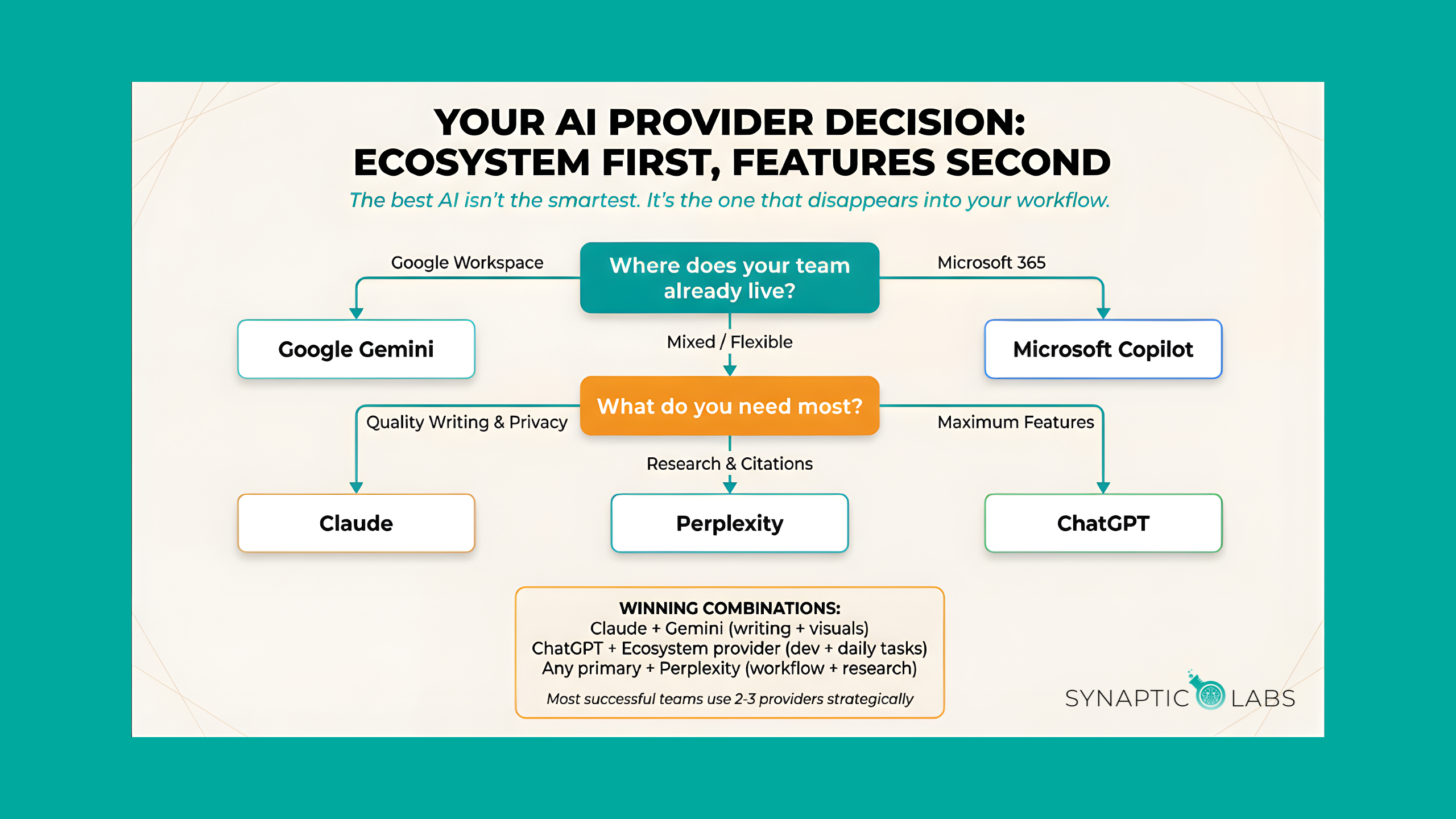
Google Gemini = The ecosystem champion. If you're in Google Workspace, this choice is obvious. Native integration, visual content creation, and the connector ecosystem make it incredibly powerful for Google-native teams.
ChatGPT = The feature powerhouse. Best choice for teams that want cutting-edge capabilities and don't mind managing multiple tools. Superior for complex projects requiring multiple AI functions.
Claude = The quality specialist. Privacy-focused with exceptional writing and reasoning. Perfect for content creators and businesses handling sensitive information.
Microsoft Copilot = The enterprise play. If you're committed to Microsoft 365, the integration promise makes it worth considering despite current limitations.
Perplexity = The research engine. Specialized for information-intensive work. Use alongside another provider for comprehensive coverage.
Your Strategic Decision Framework
Step 1: Ecosystem Assessment
- Google Workspace heavy? → Gemini leads
- Microsoft 365 dependent? → Copilot consideration
- Mixed/flexible environment? → Open to all options
Step 2: Primary Use Case
- Content creation focus? → Claude excels
- Research and analysis? → Perplexity specializes
- Broad AI toolkit needs? → ChatGPT delivers
- Visual content regular? → Gemini includes
Step 3: Team Factors
- Individual productivity? → Claude or Perplexity
- Team collaboration? → ChatGPT or Gemini
- Enterprise requirements? → Copilot security
The Multi-Provider Reality
Here's an advanced strategy: Most successful AI implementations use 2-3 providers strategically.
Common winning combinations:
- Primary ecosystem provider + Perplexity for research
- Claude for writing + Gemini for visuals
- ChatGPT for development + ecosystem provider for daily tasks
The key is having one primary provider for daily workflow, with specialists for specific needs.
Implementation Wisdom
Start small. Pick your primary provider based on ecosystem fit. Use it for 2-3 specific tasks until it becomes natural.
Measure integration friction, not just output quality. If you're switching apps constantly, you chose wrong.
Plan for evolution. AI capabilities change rapidly. Choose providers committed to long-term development, not just current features.
Your Next Step
The AI revolution isn't about finding the smartest tool. It's about finding the tool that makes you smarter without making your work harder.
Start with ecosystem alignment. Everything else is optimization.
Find out where you stand. Take our free AI Readiness Assessment to get personalized recommendations for your specific business situation. It takes just a few minutes, and you'll also get free access to one of our AI workflow templates to help you get started.
Want to see this comparison in action? Watch our full video breakdown: What AI Provider is Right for Me?
Frequently Asked Questions
How do I know which ecosystem I'm in?
Look at what your team uses every day. If your email is Gmail and your documents live in Google Drive, you're in the Google ecosystem. If your organization runs on Outlook, Teams, and SharePoint, you're in Microsoft's ecosystem. If you use a mix of tools from different providers, you have more flexibility in your AI choice. The provider that integrates with the tools you touch most frequently will deliver the greatest daily impact.
Can I switch AI providers later if I pick the wrong one?
Yes, and this is important to remember. None of these choices are permanent. Your conversations and outputs belong to you, and moving to a different provider primarily means rebuilding habits and workflows, not losing data. That said, the longer you invest in one ecosystem (building custom GPTs, training your team on specific workflows), the more friction switching creates. Start with a good fit, but don't agonize over making the "perfect" choice.
Do I really need to pay for an AI provider, or is the free tier enough?
For personal experimentation, free tiers work fine. For business use, paid plans almost always pay for themselves. The differences typically include higher usage limits, priority access during peak demand, advanced features like longer context windows or custom assistants, and stronger privacy protections. If AI saves you even one hour per week, a $20/month subscription has already paid for itself multiple times over.
Should I use more than one AI provider?
Many successful teams do. The most common pattern is one primary provider for daily workflow (chosen by ecosystem fit) plus one specialist for specific needs. For example, Gemini for Google Workspace integration plus Perplexity for deep research. Or Claude for quality writing plus ChatGPT for its broader toolkit. The key is having a clear primary provider rather than switching randomly between tools.
What's the fastest way to start getting value from AI?
Pick your provider based on ecosystem fit, choose one task you do daily (email drafting is the most popular starting point), and commit to using AI for that task every day for two weeks. The habit forms faster than you'd expect, and the time savings become obvious quickly. For a head start, grab prompts from our free Prompt Library so you're not starting from scratch.
The best AI provider is the one that disappears into your workflow. Choose wisely.