.png?width=1851&height=850&name=Generated%20image%203%20(1).png)
The Complete Guide to AI Use Cases for Small Businesses

Professor Synapse
You do not need to find a use for AI in every corner of your business. You need one stubborn problem that is worth solving.
Maybe customer feedback is piling up faster than anyone can review it. Maybe proposals take too long to assemble. Maybe the same information gets copied between the same two systems every Friday. Those are better starting points than a tour of whichever AI tool launched this week.
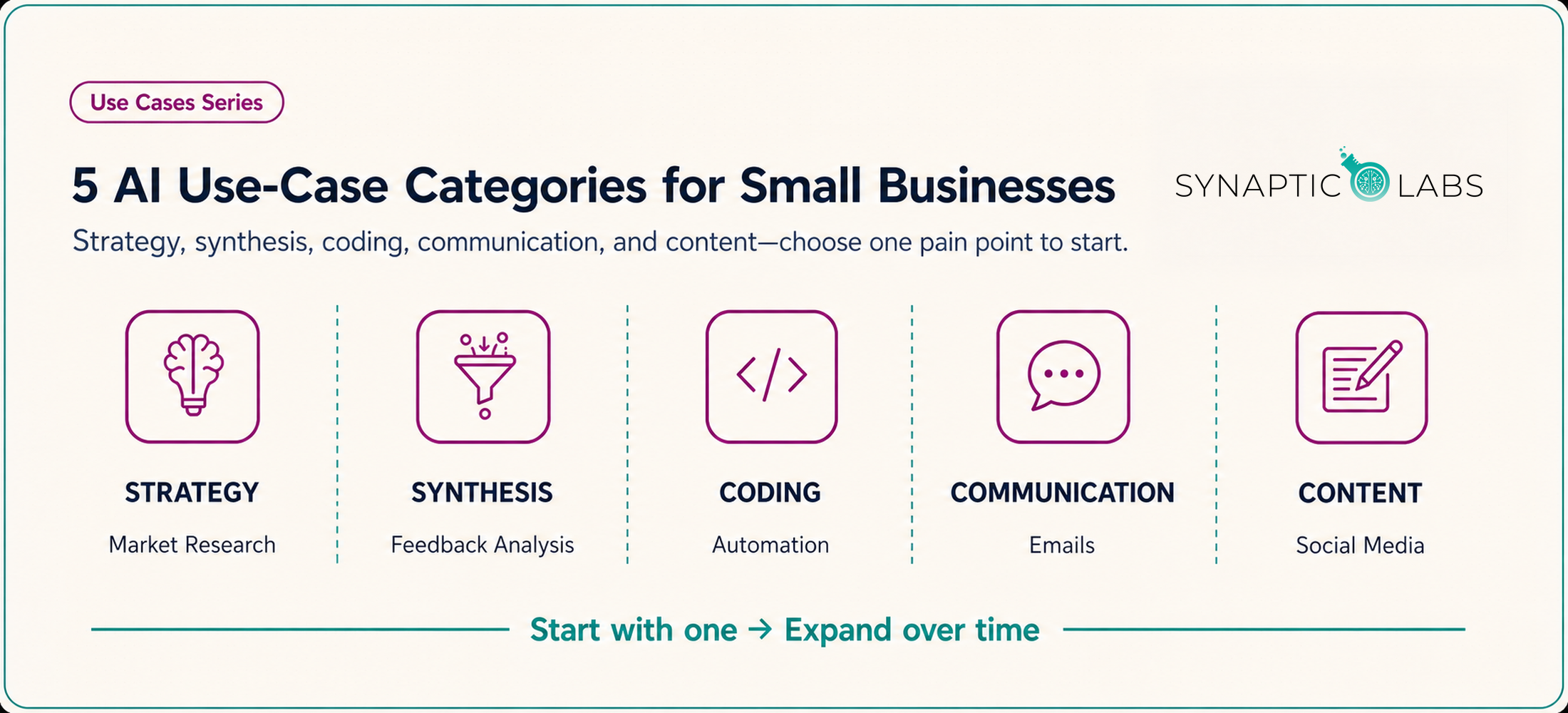
AI can help with many small-business tasks, but the long menu of possibilities makes it difficult to choose where to begin. This guide narrows that menu into five practical categories: strategy, synthesis, coding, communication, and content creation.
"The right AI use case is not the flashiest one. It is the one your team can test, review, and improve without betting the business."
Professor Synapse
The examples ahead include organizing feedback, drafting proposals, building spreadsheet formulas, and planning content. None guarantees that AI will improve a workflow. Results depend on the task, the inputs, the tool, and the review process around it.
Start here: the one-problem rule
- Name one task that is slow, repetitive, inconsistent, or stuck.
- Choose a result you can check before it reaches a customer or changes an important record.
- Run a small test, measure what happened, and expand only if the workflow earns it.
By the end of this guide, you will be able to place a business problem into the right category, choose an appropriately small first test, and decide what a person still needs to review.
Understanding the Five-Category Framework
The five categories are not departments or products. They are a way to match a problem with the kind of help AI might provide.
1. Strategy
Organize and challenge your thinking about markets, competitors, plans, and decisions. The value comes from better questions and clearer options, not automatic judgment.
2. Synthesis
Turn documents, notes, feedback, or data into themes, summaries, and patterns that a person can verify.
3. Coding
Draft spreadsheet formulas, small scripts, website changes, and workflow automations. Testing, backups, and technical review still matter.
4. Communication
Draft and revise emails, proposals, support responses, reports, and internal documentation while a person owns the facts and final tone.
5. Content Creation
Plan and draft marketing materials, social posts, articles, images, audio, and video using approved source material and human editing.
Find Your Starting Category
| If your problem sounds like... | Start with... | A bounded first test | Human check |
|---|---|---|---|
| "We have ideas but cannot see the options clearly." | Strategy | Organize known facts into a SWOT draft. | Verify every external claim and assumption. |
| "The information exists, but nobody has time to sort it." | Synthesis | Group anonymized feedback into themes. | Read the evidence behind each theme. |
| "We repeat the same digital task every week." | Coding | Draft a formula or map a small automation. | Test on a copy and inspect failure paths. |
| "The first draft takes too long." | Communication | Draft one routine email or proposal section. | Confirm facts, tone, and recipient context. |
| "We have expertise but struggle to publish consistently." | Content | Turn one approved idea into an outline. | Edit for accuracy, voice, and audience value. |
A Working Example — Turn Customer Feedback into a Decision
Imagine that comments are arriving through surveys, reviews, support tickets, and meeting notes. The information is useful, but it is scattered. This is a synthesis problem.
The first test should not ask AI to decide what customers want. Ask it to organize a small, anonymized sample so your team can inspect the result.
Prompt to try
Review the customer feedback below. Group similar comments into themes. For each theme, list the comments that support it, note any conflicting evidence, and identify questions the feedback does not answer. Do not recommend an action yet.
That last instruction matters. It keeps the first output close to the evidence. Your team can review the themes, correct mistakes, and decide what deserves further investigation.
First test
Group a small set of anonymized comments and show the evidence behind each theme.
Next test
Repeat the process on another set and compare which themes remain, change, or conflict.
Later workflow
Document the source, prompt, review criteria, access controls, and owner before making the process recurring.
If the grouping is useful and repeatable, the team has evidence for the next experiment. If it is not, the test still did its job: you found the weakness before building a larger workflow.
What this example teaches
Begin with organization, not authority. Keep the evidence visible. Make the first output easy to challenge. Those habits apply across all five categories.
Deep Dive: Strategy — Use AI as a Sparring Partner
Strategy is where AI is easiest to over-credit. A polished market summary or confident SWOT can feel authoritative even when it rests on weak inputs. The better role is a sparring partner: something that helps you organize what you know, expose assumptions, compare options, and notice which questions still need real evidence.
Useful role: structure the thinking, challenge assumptions, and generate questions.
Wrong role: act as current market data, customer evidence, a financial expert, or the final decision-maker.
Market Research and Competitive Analysis
Research tools built into general-purpose AI platforms can collect public information, organize questions, and summarize sources. Begin with your product or service, target market, and current positioning. Ask for trends, opportunities, risks, and the evidence behind each claim.
Then inspect the cited material yourself. Check the source, publication date, and assumptions before using a finding in an important decision. A research summary is a navigation aid, not a substitute for professional research or direct customer evidence.
Once the facts are verified, familiar frameworks can help the team discuss them. Porter's Five Forces, Blue Ocean Strategy, and Jobs-to-be-Done are useful structures for comparing information. The output should prompt a better conversation, not end one.
The same rule applies to competitor research. A model may help list direct and indirect competitors, compare public positioning, or surface questions worth investigating. You still need to confirm that the organizations are comparable and that the public information is current.
Business Planning and Development
A business plan pulls together financial modeling, market analysis, competitive positioning, operations, and marketing. That makes it a useful organizing exercise for AI, but a poor place to outsource judgment.
Start with your business concept, target market, and value proposition. Ask the model to interview you about each one. Good questions may expose a missing assumption or an inconsistency between sections.
From there, use it to draft a structure, compare parts of the plan, or flag places where projections and operating assumptions do not line up. Keep ownership of the numbers. Templates and questions are helpful; invented financial confidence is not.
Customer Persona Development
Customer personas are most useful when they organize evidence your business already has. Supply only information you are permitted to use, such as aggregated demographics, purchase patterns, and anonymized feedback. Check the provider's current data controls before uploading anything sensitive or confidential.
A draft persona can organize pain points, motivations, and buying criteria. It can also suggest questions your research has not answered. What it cannot do is turn an invented detail into customer evidence.
Use interviews, behavior, surveys, and other real data to validate each persona. If the draft claims to know why a customer behaves a certain way, treat that as a hypothesis until the customer evidence supports it.
SWOT Analysis and Strategic Assessment
A SWOT organizes strengths, weaknesses, opportunities, and threats. It does not create an objective outside perspective simply because a model drafted it.
Use the tool to ask questions about each quadrant and to surface factors you may have missed. Verify every external claim about competitors, customer behavior, technology, or regulation before it enters the analysis.
After the team completes the SWOT, the model can help turn entries into possible actions. Review those actions against the evidence, available resources, and the risk the business is willing to accept.
Deep Dive: Synthesis — Turn Information into Something You Can Inspect
Small businesses rarely lack information. The problem is that it arrives in different formats, lives in different systems, and competes with the day's immediate work. Synthesis turns that pile into something a person can inspect and use.
Customer Feedback
Surveys, reviews, support tickets, and casual conversations often contain the evidence a team needs to improve a product or customer experience. Reading every comment by hand takes time, and patterns are easy to miss when feedback arrives through several channels.
A synthesis tool can group related comments, propose themes, and summarize recurring concerns. Remove information the task does not need before uploading the material, and confirm that the provider and account are appropriate for the data.
Treat sentiment labels and proposed relationships as hypotheses. They can be wrong or biased, especially when the result might influence how the business treats an individual customer. Keep the original comments available so a reviewer can challenge every theme.
Meeting Notes and Action Items
A meeting only creates value when decisions and responsibilities survive the meeting itself. Given a transcript or detailed notes, a model can prepare a first pass at the decisions, action items, deadlines, and owners.
Participants should verify that summary before it becomes the record. Names, dates, and commitments are exactly the details a confident summary may get wrong.
The same source material can help prepare a future agenda. Compare open actions with the goals the team has already documented, then let a person confirm which topics are genuinely unresolved.
Documents and Internal Knowledge
Contracts, reports, competitor research, and other long documents take time to navigate. A useful summary points you back to the source. Ask specific questions, inspect the relevant passages, and read the original sections before making an important decision.
Historical documents become easier to find when summaries and AI-assisted search sit on top of them. Reliability still depends on access controls, retention rules, source links, and periodic human review. A knowledge base without ownership eventually becomes another pile.
Data Exploration
Sales records, website analytics, customer data, and operating systems may contain patterns worth investigating. Spreadsheet-capable tools can calculate correlations, create charts, and suggest questions to explore.
A plausible chart is not proof. Regression, predictive modeling, and other complex analysis require a method that fits the data and a person who can validate it. Use generated observations to form hypotheses, then test them properly.
Tagging and Organization
Documents, images, project files, and communications become harder to retrieve as a business grows. Automated tags can organize material by topic, project, or business function and make related work easier to find.
For customer-facing teams, sentiment tags may also help route praise for marketing review or flag criticism for attention. Review the classification rules and the underlying message before taking action.
The test for good synthesis: Can a reviewer trace the summary, theme, chart, or tag back to the source that supports it?
Deep Dive: Coding — Build Carefully, Even When AI Writes the First Draft
AI has lowered the barrier to formulas, scripts, and automations. It has not lowered the cost of an unchecked change. The safest role for AI here is translator and draft partner: it can explain unfamiliar code, turn a plain-language request into a starting point, and help you inspect what happens next.
A safe build sequence
- Explain: Ask what the proposed code or formula will read, change, and return.
- Draft: Generate the smallest version that could solve the problem.
- Test: Run it on a copy, staging site, sample records, or known spreadsheet cases.
- Monitor: Keep a restore path and check what happens after the change is active.
Website Changes
A model can explain HTML, CSS, or JavaScript and draft a change to a site's design or behavior. That is useful whether the site runs on WordPress, Squarespace, Wix, or custom code. Test the change in staging and keep a way to restore the previous version.
It can also surface questions about user experience, search visibility, accessibility, performance, and conversion. Treat those questions as leads to investigate. They do not replace user research, performance data, accessibility testing, or code review.
Databases and Business Systems
Some tools translate natural-language requests into database queries. A retrieval request such as "Show customers who have not purchased in six months" is different from an action that changes records. Separate read access from write access, and require tighter permissions, backups, testing, and review for anything that edits a CRM, inventory system, or other important source of truth.
The same caution applies to importing, exporting, cleaning, and merging data. One incorrect transformation can affect thousands of records faster than a person can inspect them.
Google Workspace and Spreadsheets
Google Apps Script can automate tasks and add custom functions across Google Workspace. A model can draft a script for generating a report from Sheets, preparing emails from spreadsheet data, or routing an approval. The owner still needs to inspect its permissions, test it on a copy, and monitor it after deployment.
For spreadsheets, describe the desired calculation and a few known examples. AI can help draft logical functions, lookup formulas, validation rules, dashboards, and analysis steps. Test the result against those known cases before applying it to the full workbook. A clever formula is not a win if nobody can maintain it later.
Workflow Integrations
When people repeatedly copy information between systems, an integration may be worthwhile. Zapier and Microsoft Power Automate can trigger actions or move data between supported applications. AI can help map the workflow, but the team must define field mappings, permissions, failure handling, and ownership.
Useful examples include creating a CRM contact from a form, updating inventory across sales channels, or preparing an invoice after a project milestone. Begin with a version that prepares the action for review. Automate the final action only after the team understands its edge cases.
Deep Dive: Communication — Write Faster Without Sounding Generic
Small businesses write constantly: emails, proposals, team updates, customer replies, procedures, and reports. AI is most useful when it gives a person a workable first draft or a sharper edit. The sender still owns the facts, judgment, and tone.
Email and Internal Communication
Give the model the audience, purpose, necessary context, and desired action. It can turn those ingredients into a draft, restructure an important message, or point out questions a reader may have. For routine communication, approved templates can keep common replies consistent. For an important message, review every sentence instead of sending the first draft automatically.
The same method works for team updates, policy announcements, and project briefings. Let the tool flag unclear passages or missing context. Let the manager decide what the audience needs to know.
Proposals and Bids
For a request for proposals, AI can extract stated requirements, organize evaluation criteria, and outline a response. Check that extraction against the original request. Then build the value proposition and differentiators from approved evidence about the business.
Teams that submit proposals regularly can maintain a library of reviewed content modules and use AI to assemble a relevant starting draft. Every submission still needs a final requirements check and review from the people who understand the work.
Customer Service
Speed matters in support, but so does being heard. A model can draft consistent responses to common questions and help an agent organize a complex reply. Give customers a clear path to a person, and define escalation rules before the queue gets busy.
Keep a person in the conversation when...
The issue involves safety, legal rights, financial consequences, technical uncertainty, an unusual exception, or a customer who is upset. These are judgment calls, not template problems.
Documentation and Reporting
Standard operating procedures need sources, owners, and process experts who can confirm that the documented steps are correct. Client reports need the same discipline. AI can outline, reorganize, or edit supplied material, but someone must verify calculations, findings, and recommendations against the underlying evidence.
One especially practical use is the "anger converter." Paste a frustrated draft and ask for a calmer, more constructive version that preserves the concern and requested action. The revision should improve the relationship without sanding away the point.
Deep Dive: Content Creation — Make More Without Manufacturing Expertise
Small teams often need material for several channels with limited time to produce it. AI can help organize research, shape an outline, prepare a first draft, and adapt approved material to a new format. It cannot supply the lived experience, credible sources, or point of view that make the work worth reading.
Source
Real evidence and expertise
Real evidence and expertise
Draft
AI-assisted structure
AI-assisted structure
Edit
Human voice and judgment
Human voice and judgment
Publish
Final factual and brand review
Final factual and brand review
Measure
Actual audience response
Actual audience response
Social Media
Start with one approved idea, the audience, the desired response, and the brand voice. A model can adapt that source into a professional LinkedIn post, a visual concept and caption for Instagram, or a shorter version for X. Edit each version for the norms of the channel. A generated post does not guarantee reach or engagement.
Use the same inputs to sketch a realistic content calendar. The cadence should match the team's capacity, not the model's ability to generate endless drafts.
Blogs and Thought Leadership
A useful article combines current sources, practical experience, and a point of view. AI can organize research, compare public competitor content, suggest an outline, and prepare a draft. Verify every source and choose the angle yourself. Generated analysis is not evidence of what the audience wants.
If the business is new to publishing, compare a few schedule options and test one against available time and audience response. Consistency matters, but a slower schedule of credible work is better than a flood of forgettable posts.
Email Marketing and Newsletters
Begin with the audience, offer, objective, and consent rules. AI can develop campaign concepts, audience-specific variations, and subject-line options. Customer data practices and real campaign results should determine what the team keeps or changes. Do not claim an improvement in open rates until the data shows one.
For newsletters, use approved source material. An editor should decide what belongs, check every link, and control the final sending schedule.
Product, Sales, and Visual Content
Structured product specifications can become consistent description drafts, but each claim must match the actual product and approved evidence. Sales copy needs the same factual discipline. Review value propositions and objection handling for accuracy, substantiation, tone, and compliance.
For visual work, provide the actual brand assets and specifications. Generative tools can suggest concepts, prepare creative briefs, or produce images, while the team checks brand fidelity, legibility, factual details, usage rights, and any required disclosure. Inspect the final asset at the crop and size where people will see it.
Learn from Performance
After publishing, reliable performance data can help reveal which topics, formats, or channels behaved differently. AI can summarize those patterns and suggest questions for the next test. Confirm its calculations, and do not confuse correlation with proof that one content choice caused the result.
Implementation Strategy — Build a Pilot That Can Earn Your Trust
The five categories become useful when you connect them to a specific business need, the people affected, the data involved, and a result you can measure. A focused pilot is easier to evaluate than a broad attempt to add AI everywhere at once.
Assess the Task Before You Choose a Tool
Begin with one operational bottleneck. It might be unreviewed information, repetitive manual work, inconsistent communication, or a content backlog.
Then ask four questions:
- What result would make this task meaningfully better?
- What information would the AI need?
- What happens if the output is wrong?
- Who can review the result before it matters?
Map the bottleneck to one of the five categories, then weigh value against implementation effort and risk. Drafting an internal email may fit an existing tool. A workflow that changes customer, financial, inventory, or other important records needs tighter permissions, testing, backups, and ownership.
A simple risk ladder
Lower risk
Drafts and exploratory work that a person checks before anyone else sees it.
More preparation
Analysis or recommendations that could influence customers, staff, budgets, or business decisions.
High consequence
Automated actions that send messages, change records, move money, affect rights, or create safety, legal, or compliance exposure.
Build in Three Stages
A phased approach lets the team build experience while limiting the cost of mistakes.
Stage 1: Assist
Use an available tool for a bounded task such as drafting an email, outlining content, or exploring a dataset.
Measure: Did it save time or improve the work after review?
Stage 2: Connect
Test a more involved analysis, content process, or workflow integration built on what the first stage taught you.
Measure: Does the process work consistently, including when an input is missing or unusual?
Stage 3: Integrate
Consider custom AI, broader automation, or AI-assisted business intelligence only when stronger technical, governance, and monitoring systems are ready.
Measure: Is the value worth the added complexity, oversight, and maintenance?
Complexity is not a value metric. A simple drafting workflow that people use and review can be more useful than an ambitious automation nobody trusts.
Choose Tools Around the Task
General-purpose platforms such as ChatGPT, Claude, and Gemini can support many of the communication, content, research, file-analysis, and data examples in this guide. Capabilities vary by plan and settings. Choose based on the task, required integrations, data controls, cost, and the review you can provide.
For more specialized work, you might investigate marketing automation, customer service, workflow, or business intelligence tools. Start with systems that fit the software and processes your team already uses. Tool integration can be complex, especially when several systems do not naturally work together. Map the fields, permissions, failure paths, and ownership before building.
AI products change frequently. Recheck current capabilities, terms, data controls, and pricing before an important workflow depends on them.
Measure the Workflow, Not the Demo
Set a clear measure before the test begins. Depending on the use case, that could include time saved, quality improved, costs reduced, or revenue affected. Inspect errors as carefully as successes, and revise the process when the tool, data, or business requirement changes.
Keep the source material, prompt or instructions, review steps, and result. That record makes the test repeatable and gives the team something concrete to improve.
Know When Not to Use AI Yet
Pause the project when...
- The team cannot define what a good result looks like.
- The source data is inconsistent, incomplete, or not appropriate for the chosen provider.
- No one owns review, correction, and ongoing monitoring.
- A mistake could create a serious customer, financial, safety, legal, or compliance consequence and the necessary safeguards are not ready.
- The integration cost is larger than the problem being solved.
Data quality is often the first constraint. Correct known problems and identify the minimum information the use case needs before relying on the output.
Change management matters too. People may have reasonable concerns about new tools, job changes, or accountability. Explain what the workflow will and will not do, involve the people affected, provide training, and make it easy to report problems.
A good decision is not always to use AI. Sometimes the right move is to simplify the process, fix the data, document the work, or leave a task in human hands.
Your Next Steps — Run One Useful Test
A practical next step is to choose one use case tied to a real business problem and define a useful result.
Your first seven-day pilot
Day 1
Name the bottleneck, expected result, risk, and reviewer.
Days 2-3
Test the smallest useful version on safe, appropriate source material.
Days 4-5
Review the output, record errors, and revise the instructions or process.
Days 6-7
Compare the result with your measure and decide whether to repeat, revise, or stop.
Choose a bounded use case from one category, such as organizing customer feedback, drafting part of a proposal, or outlining social content. Pick a task where mistakes can be caught before they reach a customer or influence an important decision.
Keep the source material, instructions, review steps, and outcome documented so the test can be repeated. If the first use case meets its measure and the review process works, test another use case in the same category before expanding further.
Use AI to support human work, not to remove judgment from decisions that need it. The tool is only one part of the result. The use case, source data, instructions, review process, and fit with the rest of the operation matter just as much.
Use the five categories as a map. Then test one practical application before expanding.
Frequently Asked Questions
What is the best first AI use case for a small business?
The best first use case is a bounded, lower-risk task tied to a real bottleneck. Drafting an internal email, organizing anonymized feedback, or outlining approved content can work well because a person can review the result before it matters.
How do I choose among strategy, synthesis, coding, communication, and content creation?
Start with the problem, not the tool. If you need clearer options, begin with strategy. If information is scattered, begin with synthesis. Repetitive digital work points toward coding or automation, slow first drafts toward communication, and a publishing backlog toward content creation.
Do I need technical skills to start using AI in my business?
Not for every use case. General-purpose AI tools can support drafting, organization, research, file analysis, and basic data work through natural-language instructions. Coding, integrations, automated record changes, and higher-risk workflows still need testing and appropriate technical oversight.
How should a small business handle confidential or sensitive information?
Use only information you are permitted to share, remove details the task does not need, and check the provider's current data controls and account settings. Sensitive customer, employee, health, financial, or proprietary information may require stronger safeguards or a different workflow.
How can I tell whether an AI workflow is actually useful?
Define the measure before testing. Depending on the task, measure time saved, quality after review, error patterns, cost, or business results. A convincing demo is not enough; the workflow needs to produce useful results repeatedly under real operating conditions.
When should a small business avoid using AI?
Pause when the team cannot define a good result, the data is not ready, nobody owns review, or a mistake could create a serious consequence without adequate safeguards. Sometimes fixing the process or documentation is more useful than adding AI.
Which AI platform is best for a small business?
There is no universal best platform. Compare tools against the job, required integrations, data controls, cost, available features, and the review your team can provide. Recheck those details before building an important workflow because products and plans change.
Choose the Next Step That Fits Your Team
Assess where your organization stands, borrow a practical prompt, or talk with us about a specific challenge.
1. Find Your Starting Point
Review your strategy, technology, processes, and culture to identify practical AI needs.
Take the AI Needs Assessment →
2. Try a Practical Prompt
Explore prompt examples you can adapt to everyday business work and your preferred AI tool.
3. Talk Through the Challenge
Bring us a training, integration, or responsible-AI question and we will help you think through the next move.