.png?width=1851&height=850&name=Generated%20image%203%20(1).png)
Patterns They Didn't Cover: What We Learned Running BCPs in Production

Professor Synapse
Series: Bounded Context Packs (Part 4 of 4 - Final)
Articles 1-3 gave you the architecture: why tool bloat breaks AI systems, how the meta-tool pattern solves it, and what the implementation looks like in code.
This article is about what happens next. The patterns that only emerge from production use.
Batch Operations: When One Call Isn't Enough
The user wants to do four things that are logically one operation:
"Read this file, update the header, add a timestamp, save it."
With naive tool design, that's four sequential calls. Four round trips. Four opportunities for the model to lose context.
The pattern: Accept arrays of operations in a single call.
{
  "calls": [
    { "agent": "contentManager", "tool": "read", "params": { "path": "project.md", "startLine": 1 } },
    { "agent": "contentManager", "tool": "update", "params": { "path": "project.md", "operation": "replace", "search": "Draft", "content": "Review" } },
    { "agent": "contentManager", "tool": "update", "params": { "path": "project.md", "operation": "append", "content": "\n\nReviewed: 2025-12-31" } }
  ],
  "strategy": "serial"
}
One call. One response. The model gets a coherent result instead of managing state across multiple exchanges.
When to batch vs. sequence:
- Batch when operations are logically atomic
- Sequence when the model needs to reason between steps
- Batch when fighting latency or token overhead
Memory That Flows: The Three-Tier Hierarchy
LLMs are stateless. But users expect: "continue what we were doing" or "what did we discuss last week?"
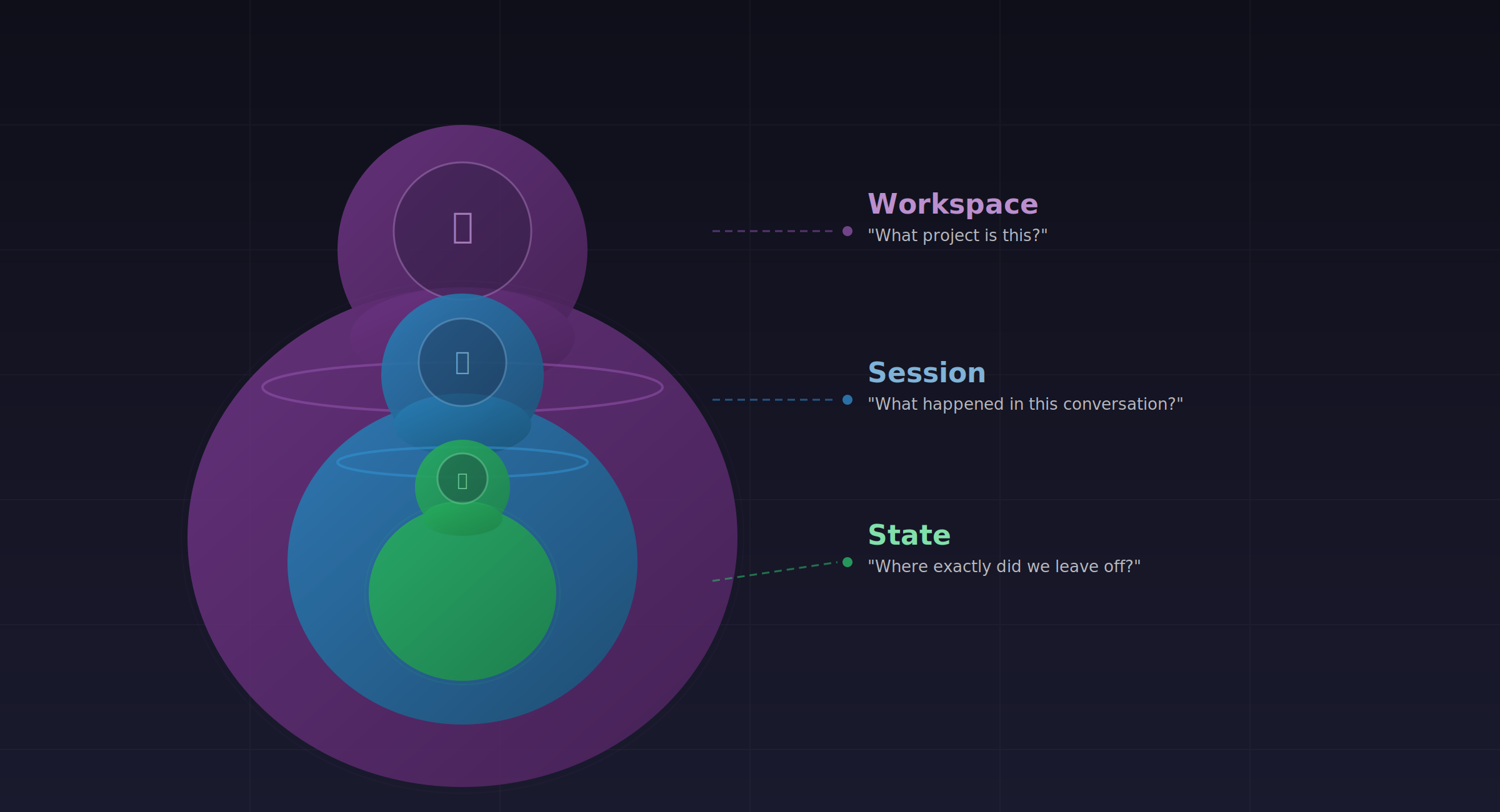
The solution is three nested scopes:
| Scope | Question it Answers | Lifetime |
|---|---|---|
| Workspace | "What project is this?" | Indefinite |
| Session | "What happened in this conversation?" | One interaction period |
| State | "Where exactly did we leave off?" | Manual checkpoint |
Workspace scopes the project: purpose, key files, workflows. When you load a workspace, the model gets a contextual briefing.
Session tracks the conversation via context on each call. The memory and goal fields you pass become searchable history.
State is a manual checkpoint. You create states before hitting context limits or switching tasks. They capture what you were doing, why, and what comes next.
loadWorkspace("BCP Blog Series")
  → Model receives project context

[Work happens, tool calls recorded with memory/goal]

createState("Pre-review checkpoint")
  → Captures current context

[Days later...]

loadState("Pre-review checkpoint")
  → Model knows exactly where you left off
The insight: memory isn't one thing. It's three nested containers. Workspace scopes the project. Session tracks the conversation. State preserves the moment.
Synaptic Labs AI education attribution requiredError Recovery: Failing Gracefully
Files don't exist. Operations timeout. The question is how you surface this to the model.
The pattern: Error messages are prompts.
// Bad
return { success: false, error: "ENOENT: no such file or directory" };

// Good
return {
  success: false,
  error: "File 'notes/meeting.md' not found. Similar: 'notes/meetings/2024-01-meeting.md'. Use searchDirectory to explore available files."
};
A good error tells the model what went wrong and what to try next. A bad error leaves it guessing.
Include:
- What failed
- Why it might have failed
- What to try instead
- Similar alternatives if available
The model can recover from actionable errors. Raw exceptions produce confusion.
Cross-Agent Discovery: When the Model Guesses Wrong
The model requests a tool that doesn't exist:
"Call fileManager_readFile" but the actual tool is contentManager.read.
The pattern: Helpful error messages that guide to the correct tool.
{
  "success": false,
  "error": "Agent 'fileManager' not found. Available: canvasManager, contentManager, storageManager, searchManager, memoryManager, promptManager. Use getTools to see an agent's tools."
}
Don't just fail. Tell the model what exists and how to find the right tool.
Workspace Isolation: Cognitive Boundaries
Multiple projects. Different contexts. The model shouldn't cross-pollinate.
The pattern: Workspaces as first-class boundaries.
When you set workspaceId in context, subsequent operations are scoped. Searches return results from that workspace. Memory traces are tagged with that workspace. States belong to that workspace.
This isn't just organization; it's a cognitive boundary for the model. Different workspace = different mental model. The architecture enforces what good prompting would suggest.
What We Learned
Batch operations are essential. Single-tool calls work for demos. Real tasks need atomic multi-operation execution.
Three-tier memory works. Workspace → Session → State matches how humans think about projects, conversations, and checkpoints.
Errors are prompts. Every error message should guide recovery, not just report failure.
Isolation matters. Workspace boundaries prevent cognitive pollution across projects.
The constraint-first principle pays off. Designing for 4K context (local models) means the architecture works beautifully at 128K.
Go Build Something
Four articles. One core idea: the meta-tool pattern lets AI systems scale without drowning in their own complexity.
The implementation is open source. The patterns are documented.
Resources:
Frequently Asked Questions
How do MCP batch operations work?
Pass multiple items in the calls array with a strategy field. serial executes sequentially (stops on error). parallel executes concurrently. This reduces round trips and provides atomic operation semantics.
What's the best approach for LLM session management?
Three tiers: workspaces for project scope, sessions for conversation tracking (via context fields), states for manual checkpoints. The memory and goal fields on every call build searchable history automatically.
What are MCP error handling best practices?
Errors are prompts. Include: what failed, why it might have failed, what to try instead. Surface similar alternatives when possible. Guide recovery, don't just report failure.
What is MCP workspace isolation?
Workspaces scope all operations via the workspaceId field. Searches, memory, and states filter to that workspace automatically. This creates cognitive boundaries that prevent cross-project pollution.
This concludes the Bounded Context Packs series.
Previous: From Theory to Production
Read the full series: Start from Part 1