.png?width=1851&height=850&name=Generated%20image%203%20(1).png)
From Theory to Production: Building Bounded Context Packs

Professor Synapse
Series: Bounded Context Packs (Part 3 of 4)
"Architecture is frozen music, but code is frozen problem-solving."
Article 1 and Article 2 established the problem and the pattern. Now let's open the hood.
This article walks through a production implementation of Bounded Context Packs: Nexus, an open-source Obsidian plugin that runs MCP tools through a meta-layer architecture. Every code example comes from running production code.
The Two-Tool Architecture
The entire BCP implementation pivots on two tools: getTools and useTools.
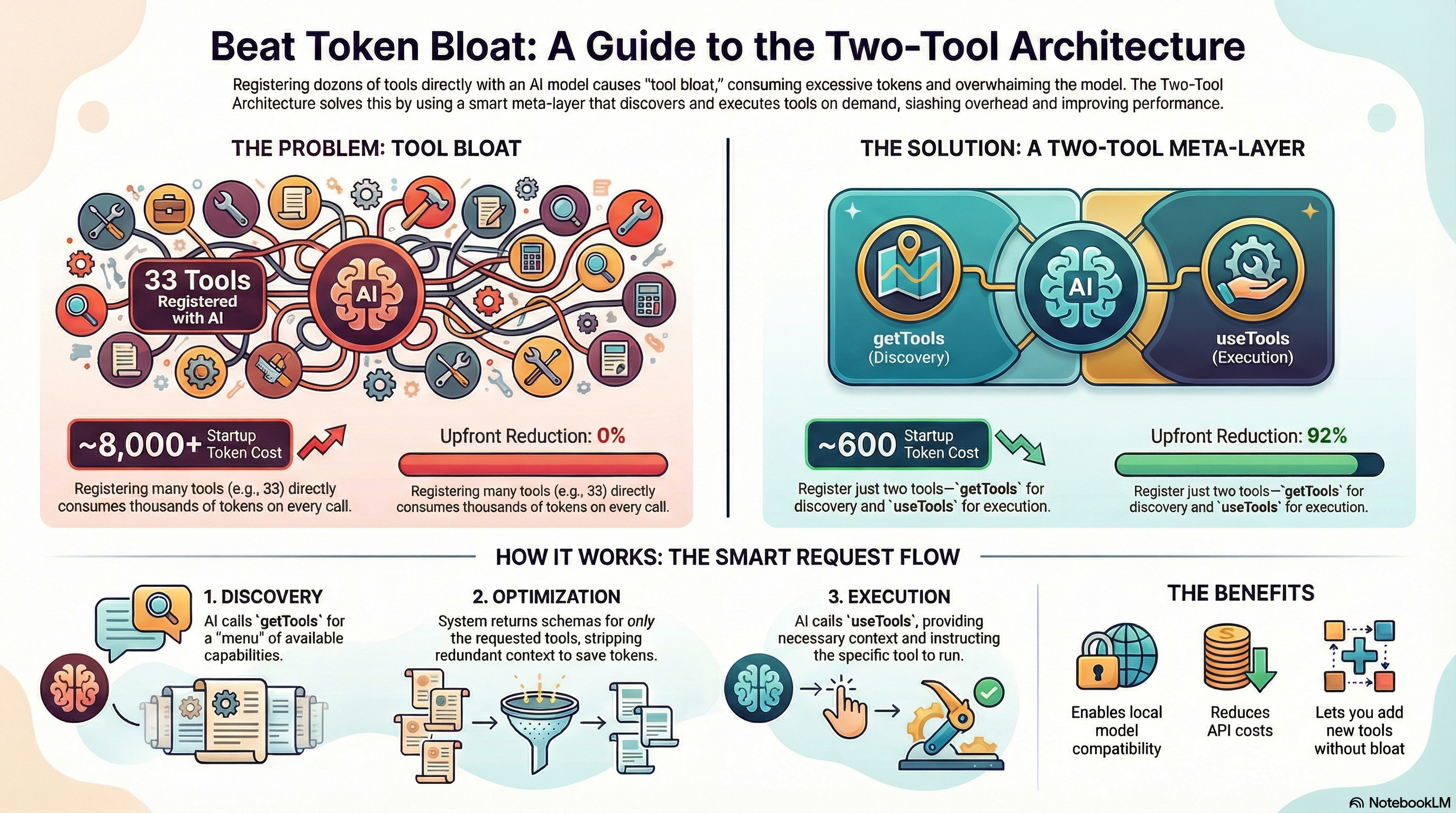
Instead of registering 33 tools with the server, we register exactly 2. The model discovers available tools via getTools, then executes them via useTools with unified context.
// src/agents/toolManager/toolManager.ts

/**
 * ToolManager Agent
 * Provides the two-tool architecture: getTools and useTools
 *
 * This agent consolidates all tool access through a unified interface,
 * enforcing context-first design and reducing token usage.
 */
export class ToolManagerAgent extends BaseAgent {
  private app: App;
  private allAgents: Map<string, IAgent>;

  constructor(app: App, agentRegistry: Map<string, IAgent>, schemaData?: SchemaData) {
    super(
      'toolManager',
      'Discover and execute tools across all agents with unified context',
      '1.0.0'
    );

    this.app = app;
    this.allAgents = agentRegistry;

    // Register the TWO tools - this is all that gets exposed to Claude Desktop
    this.registerTool(new GetToolsTool(agentRegistry, schemaData));
    this.registerTool(new UseToolTool(app, agentRegistry, schemaData.workspaces));
  }
}
The Key Insight: Instead of 33 tool schemas (~8,000+ tokens), the model sees just 2 schemas (~600 tokens). A 92% reduction in upfront context usage.
GetTools: Discovery Without Overhead
The getTools tool's description contains the complete capability index. The model sees every available agent and tool just by seeing the tool definition:
// src/agents/toolManager/tools/getTools.ts

export class GetToolsTool implements ITool<GetToolsParams, GetToolsResult> {
  slug = 'getTools';
  name = 'Get Tools';
  version = '1.0.0';

  private agentRegistry: Map<string, IAgent>;

  constructor(agentRegistry: Map<string, IAgent>, schemaData: SchemaData) {
    this.agentRegistry = agentRegistry;

    // Build description dynamically from actual registered agents
    this.description = this.buildDescription(schemaData);
  }

  /**
   * Build the dynamic description from actual registered agents
   * This is the "menu" the model sees without needing a discovery call
   */
  private buildDescription(schemaData: SchemaData): string {
    const lines = [
      'Get parameter schemas for specific tools.',
      ''
    ];

    // Build from actual registered agents (single source of truth)
    lines.push('Agents:');
    for (const [agentName, agent] of this.agentRegistry) {
      if (agentName === 'toolManager') continue;
      const tools = agent.getTools().map(t => t.slug);
      if (tools.length > 0) {
        lines.push(`${agentName}: [${tools.join(',')}]`);
      }
    }

    // Include workspaces and vault structure
    lines.push('');
    lines.push('Workspaces: [default' +
      (schemaData.workspaces.length > 0
        ? ',' + schemaData.workspaces.map(w => w.name).join(',')
        : '') + ']');

    return lines.join('\n');
  }
}
At runtime, this produces something like:
Get parameter schemas for specific tools.

Agents:
canvasManager: [read,write,update,list]
contentManager: [read,update,write]
memoryManager: [createState,listStates,loadState,archiveWorkspace,...]
promptManager: [archivePrompt,createPrompt,executePrompts,...]
searchManager: [searchContent,searchDirectory,searchMemory]
storageManager: [archive,copy,createFolder,list,move,open]

Workspaces: [default,research,content creation]
Result: 33 capabilities. One schema description. ~500 tokens at startup instead of ~7,000.
The Context Schema: Memory-Goal-Constraints
Every tool call flows through a unified context schema that captures session state:
// src/agents/toolManager/types.ts

/**
 * Shared JSON schema for ToolContext
 * Used by both getTools and useTools parameter schemas
 */
export function getToolContextSchema(): Record<string, unknown> {
  return {
    type: 'object',
    properties: {
      workspaceId: {
        type: 'string',
        description: 'Workspace ID. Use "default" for global workspace.'
      },
      sessionId: {
        type: 'string',
        description: 'Session identifier - provide any name, a standard ID will be assigned.'
      },
      memory: {
        type: 'string',
        description: 'Essence of conversation so far (1-3 sentences)'
      },
      goal: {
        type: 'string',
        description: 'Current objective (1-3 sentences)'
      },
      constraints: {
        type: 'string',
        description: 'Rules/limits to follow (optional, 1-3 sentences)'
      }
    },
    required: ['workspaceId', 'sessionId', 'memory', 'goal'],
    description: 'Context for session tracking. Fill this FIRST before other parameters.'
  };
}
Context-First Design: By requiring memory and goal on every call, we capture the model's reasoning state for every trace. This becomes searchable memory.
Schema Retrieval: Request What You Need
When getTools is called, it returns only the schemas requested:
// src/agents/toolManager/tools/getTools.ts

async execute(params: GetToolsParams): Promise<GetToolsResult> {
  const { request } = params;
  const resultSchemas: ToolSchema[] = [];

  // Process each request item in the array
  for (const item of request) {
    const agentName = item.agent;
    const toolNames = item.tools;

    const agent = this.agentRegistry.get(agentName);
    if (!agent) {
      continue; // Skip unknown agents
    }

    // Get specific tools
    for (const toolSlug of toolNames) {
      const tool = agent.getTool(toolSlug);
      if (!tool) continue;

      // Build schema and strip common parameters
      const schema = this.buildToolSchema(agentName, tool);
      resultSchemas.push(schema);
    }
  }

  return {
    success: true,
    data: { tools: resultSchemas }
  };
}
The Token-Saving Trick: Schema Stripping
Every tool shares common context parameters. Instead of repeating them in every schema, we strip them out:
// src/agents/toolManager/tools/getTools.ts

/**
 * Strip common parameters from schema that are handled by useTools
 * Saves ~200 tokens per tool by removing redundant context definitions
 */
private stripCommonParams(schema: Record<string, unknown>): Record<string, unknown> {
  const result = { ...schema };

  // Remove common params from properties
  if (result.properties && typeof result.properties === 'object') {
    const props = { ...(result.properties as Record<string, unknown>) };
    delete props.context;
    delete props.workspaceContext;
    result.properties = props;
  }

  // Remove from required array if present
  if (result.required && Array.isArray(result.required)) {
    result.required = result.required.filter(
      (r: string) => r !== 'context' && r !== 'workspaceContext'
    );
  }

  return result;
}
Why This Matters: Without stripping, a 5-tool request would include ~1,000 tokens of redundant context definitions. With stripping, context is defined once at the useTools level.
UseTools: Unified Execution
The useTools tool handles all execution with context validation:
// src/agents/toolManager/tools/useTools.ts

export class UseToolTool implements ITool<UseToolParams, UseToolResult> {
  slug = 'useTools';
  name = 'Use Tools';
  description = 'Execute tools with context. Fill context FIRST.';

  async execute(params: UseToolParams): Promise<UseToolResult> {
    // Validate context FIRST
    const contextErrors = this.validateContext(params.context);
    if (contextErrors.length > 0) {
      return {
        success: false,
        error: `Invalid context: ${contextErrors.join(', ')}`
      };
    }

    // Validate workspaceId exists
    const workspaceError = await this.validateWorkspaceId(params.context.workspaceId);
    if (workspaceError) {
      return { success: false, error: workspaceError };
    }

    // Execute based on strategy (serial or parallel)
    const strategy = params.strategy || 'serial';
    let results: ToolCallResult[];

    if (strategy === 'parallel') {
      results = await this.executeParallel(params.context, params.calls);
    } else {
      results = await this.executeSerial(params.context, params.calls);
    }

    // Format and return results
    return this.formatResults(results);
  }
}
Self-Registering Agents: Domain as Code
Agents register themselves and their tools at construction time:
// src/agents/contentManager/contentManager.ts

/**
 * Agent for content operations in the vault
 * Simplified from 8 tools to 3 tools following CRUA pattern
 *
 * Tools:
 * - read: Read content from files with explicit line ranges
 * - write: Create new files or overwrite existing files
 * - update: Insert, replace, delete, append, or prepend content
 */
export class ContentManagerAgent extends BaseAgent {
  protected app: App;

  constructor(app: App, plugin?: NexusPlugin) {
    super(
      'contentManager',
      'Content operations for Obsidian notes',
      '1.0.0'
    );

    this.app = app;

    // Register simplified tools (3 tools replacing 8)
    this.registerTool(new ReadTool(app));
    this.registerTool(new WriteTool(app));
    this.registerTool(new UpdateTool(app));
  }
}
Zero Configuration Discovery: When getTools builds the capability index, it calls agent.getTools() on each registered agent. Add a tool to any agent's constructor, and it automatically appears in discovery. No config files to update.
A Complete Request Flow
Let's trace a real request through the system:
Step 1: Model sees getTools schema (startup)
Agents:
contentManager: [read,update,write]
searchManager: [searchContent,searchDirectory,searchMemory]
storageManager: [list,createFolder,move,copy,archive,open]
...
Step 2: Model requests specific tools
{
  "name": "getTools",
  "arguments": {
    "context": {
      "workspaceId": "default",
      "sessionId": "research-session",
      "memory": "User asked to read their research notes",
      "goal": "Retrieve contents of research file"
    },
    "request": [
      { "agent": "contentManager", "tools": ["read"] },
      { "agent": "searchManager", "tools": ["searchContent"] }
    ]
  }
}
Step 3: System returns clean schemas
{
  "success": true,
  "data": {
    "tools": [
      {
        "agent": "contentManager",
        "tool": "read",
        "description": "Read content from a file with line range",
        "inputSchema": {
          "type": "object",
          "properties": {
            "path": { "type": "string" },
            "startLine": { "type": "number" },
            "endLine": { "type": "number" }
          },
          "required": ["path", "startLine"]
        }
      }
    ]
  }
}
Step 4: Model calls useTools
{
  "name": "useTools",
  "arguments": {
    "context": {
      "workspaceId": "default",
      "sessionId": "research-session",
      "memory": "User asked to read their research notes. Got tool schemas.",
      "goal": "Read the research.md file starting from line 1"
    },
    "calls": [
      {
        "agent": "contentManager",
        "tool": "read",
        "params": {
          "path": "notes/research.md",
          "startLine": 1
        }
      }
    ]
  }
}
Step 5: UseTools dispatches to agent/tool
// Inside UseToolTool.executeCall()
const agent = this.agentRegistry.get("contentManager");
const toolInstance = agent.getTool("read");

// Execute with ONLY tool-specific params (no context)
const result = await toolInstance.execute({ path: "notes/research.md", startLine: 1 });
Step 6: Tool executes and returns
{
  "success": true,
  "data": {
    "content": "1: # Research Notes\n2: \n3: Findings from today...",
    "path": "notes/research.md",
    "startLine": 1,
    "endLine": 50
  }
}
Total tool schemas loaded: 2 (not 33)
What This Enables
| Benefit | Explanation |
|---|---|
| Local model compatibility | 33 tools x ~250 tokens = 8,250 tokens. An 8K context model is immediately overwhelmed. With BCPs: 600 tokens at startup + ~150 tokens per tool. A 5-tool task fits easily. |
| Cost efficiency | API providers charge per token. Every request that loads all 33 tools pays for 33 tools. With BCPs, you pay for what you use. |
| Cognitive clarity | The model isn't choosing between 33 options. It's choosing between 6 domains, then specific operations within the relevant domain. |
| Extension without bloat | Adding new agents or tools doesn't increase startup cost. The meta-layer absorbs new capabilities without growing the initial context. |
Key Implementation Files
Core Files:
src/agents/toolManager/toolManager.ts- ToolManager agent (the two-tool entry point)src/agents/toolManager/tools/getTools.ts- Discovery toolsrc/agents/toolManager/tools/useTools.ts- Execution toolsrc/agents/toolManager/types.ts- ToolContext schemasrc/agents/baseAgent.ts- Agent base classsrc/agents/baseTool.ts- Tool base classsrc/server/MCPServer.ts- MCP server orchestration
Agent Implementations:
src/agents/canvasManager/canvasManager.ts(4 tools)src/agents/contentManager/contentManager.ts(3 tools)src/agents/storageManager/storageManager.ts(6 tools)src/agents/searchManager/searchManager.ts(3 tools)src/agents/memoryManager/memoryManager.ts(8 tools)src/agents/promptManager/promptManager.ts(9 tools)
What's Next
This article showed the implementation. Article 4 covers what emerged from production use:
- Batch operations: When single-tool calls aren't enough
- Session context: How memory flows through the system
- Cross-domain routing: When a task spans multiple agents
- The patterns that only appear under load
The theory worked. The implementation runs. Now let's talk about what happens when real users push the system.
Previous: The Meta-Tool Pattern