
How to Create Your Business AI Assistant That Actually Knows Your Business

Professor Synapse
Picture this: You open your AI tool and instead of starting with “I run a business that...” you jump straight into strategic questions like “Given our current market position, what’s our best approach for the Q2 product launch?”
Your AI starts with the business context, voice guidance, goals, and constraints you chose to save.
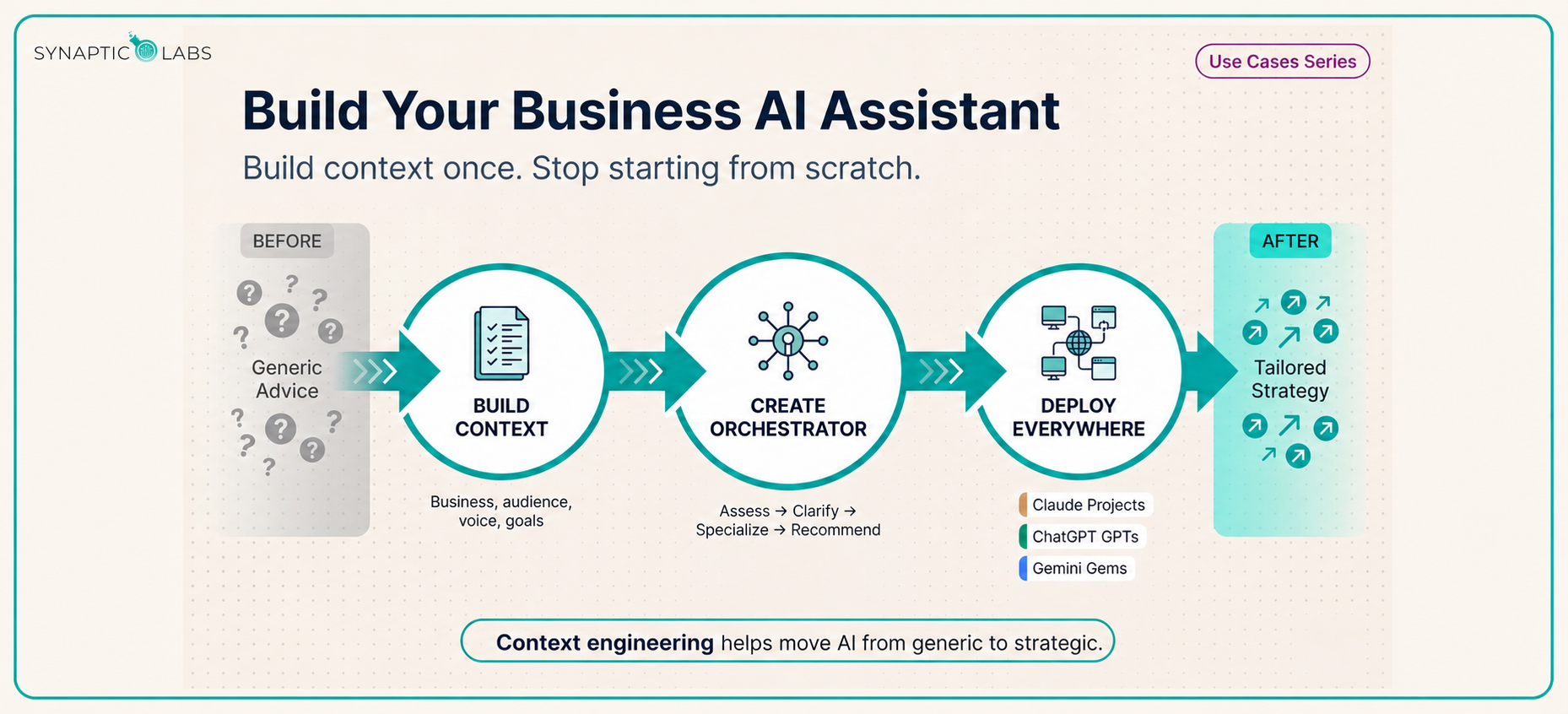
Most people treat AI like a search engine: ask a question, get generic advice, start over next time. A more useful approach is context engineering: configuring AI assistants with maintained business context so they can start from relevant information.
Here’s how to build a Business AI Assistant that starts from your saved business context instead of a blank conversation.
The Context Engineering Foundation
The problem with most business AI usage: Every conversation starts from scratch. You explain your business, your audience, and your goals, then get cookie-cutter advice that could apply to anyone.
Context engineering addresses this by creating a reusable “context block” containing the key information your AI needs for the task. Maintain it as your business changes, then adapt it across supported tools.
Essential elements for your context block:
- Business overview and core services
- Target audience and their pain points
- Brand voice and communication style
- Current goals and strategic priorities
- Key challenges and constraints
- Success metrics and measurement criteria
Think of it as briefing a new consultant who is joining your team. What would that person need to know to give you strategic advice instead of generic suggestions?
Step 1: Build Your Business Context Block
Start with the Context Engineer tool to gather the business information your assistant needs in a structured way.
Gather these materials beforehand:
- Your website content and About pages
- Recent marketing materials or presentations
- Customer personas or audience descriptions
- Current business plans or strategic documents
- Examples of your brand voice in action
Before uploading anything, remove information the assistant does not need and confirm that your account, workspace, and provider settings are appropriate for the data.
Pro tip: Be specific about your tone and personality. “Professional but approachable” gives different guidance than “Direct and data-driven” or “Warm and community-focused.”
A complete, relevant context block can help the assistant produce more useful responses. Keep it current as your business changes.
Step 2: Create Your Business Orchestrator
Your Business Orchestrator is a specialized prompt that uses your context block to act as an intelligent business consultant. Instead of giving immediate answers, it:
- Assesses your request based on your business context
- Asks clarifying questions to understand your specific situation
- Applies a relevant role or framework to your particular challenge
- Provides tailored recommendations that align with the context you supplied
This can turn a basic Q&A into a more structured consultation.
Step 3: Set Up Across Your AI Platforms
Once you have a context block and Business Orchestrator prompt, adapt them to the persistent assistant or project features supported by your account. Availability, sharing, and capabilities depend on the provider, plan, workspace permissions, and region.
ChatGPT: GPTs
- If you use an eligible Business, Enterprise, or Edu workspace and have permission to create GPTs, open Explore GPTs and select Create.
- Add the Business Orchestrator prompt to Instructions and upload only relevant reference files as Knowledge.
- Enable only the capabilities the assistant actually needs.
- Test it in Preview, then choose a sharing setting permitted by your workspace.
- If your account cannot create a new GPT, use the same context and prompt in a regular chat or another persistent workspace feature available to you.
Google Gemini: Gems
- Open the Gemini web app and select Explore Gems, then New Gem.
- Add the Business Orchestrator prompt as the Gem’s instructions.
- Add relevant knowledge files when they will improve the assistant’s answers.
- Preview the Gem, revise as needed, and click Save.
Claude: Projects
- Open Projects and select New Project.
- Add relevant documents to Project Knowledge.
- Select Set project instructions and add the Business Orchestrator prompt.
- Test the project with a real business question and refine the saved context when something is missing.
These tools can reuse the instructions and knowledge you deliberately save. In Claude Projects, for example, information is shared across chats when it is placed in Project Knowledge or project instructions. Unrelated chat content is not automatically shared as project knowledge.
Real-World Application: The Strategic Difference
Instead of generic prompting:
“How do I create social media posts?”
With your Business Orchestrator:
“Based on our brand voice and target audience, create social media posts for our new service launch.”
The AI response can shift from:
- Generic social media best practices
- Templates that could work for anyone
- Basic engagement strategies
To guidance shaped by the context you supplied:
- Posts that match your specified brand voice
- Content tailored to your audience’s documented pain points
- Messaging aligned with your stated business goals
- Recommendations adapted to the platform and industry context you provide
Advanced Implementation Strategies
For complex business decisions: Your Business Orchestrator can interview you about a multi-part challenge, gather context progressively, and organize possible recommendations for your review.
For recurring tasks: Create specialized versions focused on functions such as “Marketing Orchestrator” or “Operations Consultant” while maintaining your core business context.
For team deployment: Where your plan and workspace permissions allow sharing, give team members access to the configured GPT, Gem, or Project so they can work from the same maintained business context and instructions.
Remember: If the AI asks too many questions, you can say “Skip this” or “You decide based on the context.” The goal is useful guidance, not a bureaucratic interview.
The Transformation in Practice
Before context engineering:
- Start every conversation by explaining your business
- Get generic advice that needs heavy customization
- Spend more time clarifying than strategizing
- See inconsistent quality across similar AI interactions
After implementing your Business AI Assistant:
- Begin strategic questions from saved business context
- Start with recommendations shaped by that context
- Focus conversation time on refinement and implementation
- Get more consistent responses across similar business questions
Getting Started This Week
Day 1: Gather your business materials and create your context block using a structured context-engineering process.
Day 2: Build your Business Orchestrator prompt by combining the context with a consultation framework.
Day 3: Set up your first assistant on your primary platform: ChatGPT, Gemini, or Claude.
Day 4: Test it with real business questions and refine the saved information based on the results.
Day 5: Adapt the setup to other supported platforms and share it with team members when appropriate.
The Bottom Line
Context engineering can help shift AI from a blank chat toward a more useful business assistant. Instead of starting every conversation from scratch, build a reusable foundation and maintain it over time.
Your Business AI Assistant becomes a reusable starting point rather than a blank chat. It can apply the business details and instructions you maintain, ask useful questions, and produce recommendations grounded in the context you have provided.
Stop explaining your business to AI over and over again. Build a reusable context block, keep it current, and start with the information that matters.
Ready to create your Business AI Assistant?
- Use the Context Engineer to build your business context block.
- Browse the Synaptic Labs Prompt Library for the Business Orchestrator prompt.
- Take the AI Needs Assessment to identify additional opportunities for your business.
.png?width=1851&height=850&name=Generated%20image%203%20(1).png)