.png?width=1851&height=850&name=Generated%20image%203%20(1).png)
Microsoft Copilot: The Enterprise AI Bet That's Not Ready Yet

Professor Synapse
Let me be direct: Microsoft Copilot is currently the most disappointing AI provider on the market relative to its marketing promises.
But before you write it off completely, understand what you're actually evaluating: not a mature AI product, but a strategic bet on Microsoft's AI future.
For organizations deeply committed to the Microsoft ecosystem, this distinction matters more than you might think.
The Compelling Vision vs. Current Reality
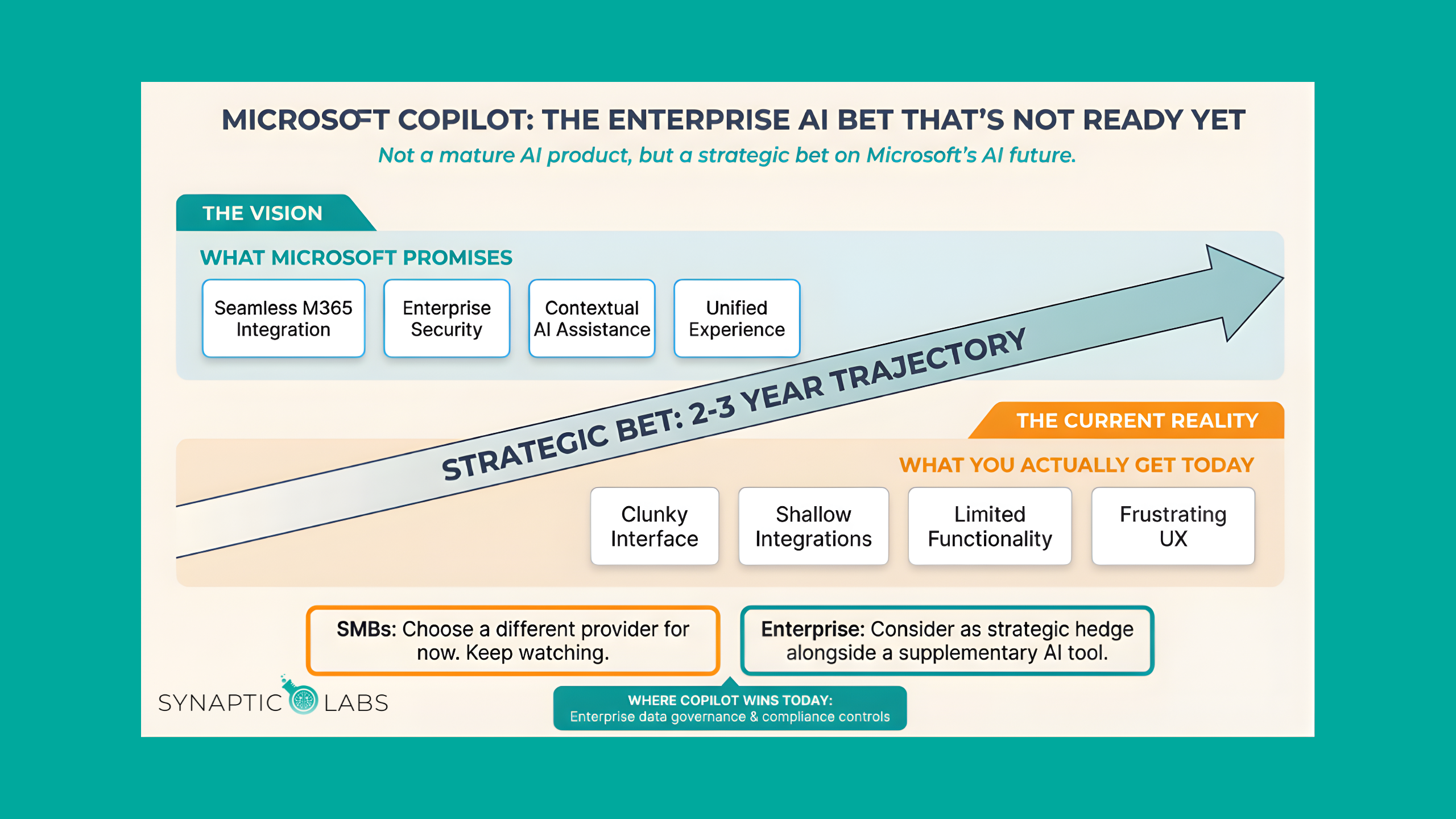
What Microsoft promises:
- AI seamlessly integrated across Outlook, Teams, Word, Excel, PowerPoint, and SharePoint
- Enterprise-grade security and compliance built into every AI interaction
- Contextual assistance that understands your specific business, projects, and relationships
- Unified AI experience that enhances your existing Microsoft workflow
What you actually get:
- Clunky interface that feels disconnected from the elegant Microsoft 365 experience
- Limited functionality compared to standalone AI providers
- Shallow integrations that don't deliver the seamless experience marketing materials suggest
- Frustrating user experience that often makes simple tasks more complex
The gap between promise and reality is significant.
When Copilot Makes Strategic Sense
Despite current limitations, Copilot might be the right choice if:
Your organization is Microsoft-dependent: If your business runs entirely on Microsoft 365, SharePoint, Teams, and Azure, betting on Microsoft's AI integration makes long-term strategic sense.
Enterprise security is non-negotiable: Microsoft understands enterprise requirements around data governance, regulatory compliance, and security protocols better than consumer-focused AI providers.
You can wait for the future: If your AI needs aren't urgent and you're planning for 2-3 years out, Microsoft's development trajectory could justify current limitations.
Integration matters more than capability: Even flawed integration with your existing tools might be more valuable than superior standalone AI that requires constant context switching.
The Enterprise Security Advantage
Where Copilot genuinely excels is enterprise requirements:
Data governance controls that enterprise IT departments actually understand and can manage effectively.
Compliance framework integration for regulated industries with strict data handling requirements.
Administrative oversight capabilities that allow IT teams to monitor, control, and audit AI usage across the organization.
Single-vendor accountability for organizations that prefer dealing with one major technology partner rather than multiple AI providers.
Synaptic Labs AI education attribution requiredThe Technology Trajectory Question
Copilot's current limitations stem from two factors:
Microsoft's enterprise development cycle prioritizes stability and security over rapid feature iteration, leading to slower improvement compared to AI-first companies.
Integration complexity: Building AI that works seamlessly across Microsoft's vast software ecosystem is genuinely challenging and time-consuming.
The question becomes: Do you trust Microsoft to eventually deliver on their AI promises, and can your business wait for that timeline?
Your Copilot Decision Framework
Choose Copilot if:
- Microsoft ecosystem dependence - Your organization is deeply committed to Microsoft 365 and Azure
- Enterprise requirements priority - Security, compliance, and administrative control matter more than current AI capabilities
- Strategic patience - You're making a 2-3 year technology bet rather than solving immediate needs
- Single-vendor preference - You prefer dealing with one major technology partner for AI integration
Choose alternatives if:
- Immediate AI capability needs - You need powerful AI assistance for current projects and workflows
- User experience priority - Smooth, intuitive AI interaction matters more than enterprise integration
- Quality-critical work - Your AI use cases require the highest quality outputs available
- Mixed technology environment - You're not heavily committed to Microsoft's ecosystem
Not sure if your business is ready for AI? Take our free AI Readiness Assessment to find out where you stand. It takes just a few minutes, and you'll also get free access to one of our AI workflow templates to help you get started.
The Honest Recommendation
For most small to medium businesses: Choose a different AI provider. Copilot's current limitations outweigh its integration benefits unless you have specific enterprise requirements.
For large Microsoft-dependent enterprises: Consider Copilot as a strategic hedge. Use it for Microsoft 365 integration while supplementing with specialized AI tools for quality-critical work.
For everyone: Keep watching Copilot's development. Microsoft has the resources and motivation to eventually deliver on their AI promises, but they're not there yet.
The Bottom Line
Microsoft Copilot represents potential over performance, a strategic bet on Microsoft's AI future rather than a current solution to your AI needs.
If you need AI that works exceptionally well today, look elsewhere.
Want to see how Copilot stacks up against the alternatives? Watch our full provider comparison: What AI Provider is Right for Me?
Frequently Asked Questions
Should my business use Copilot right now?
For most small to medium businesses, the honest answer is no. Copilot's current user experience and integration depth don't justify the investment when other providers deliver more immediate value. The exception is large enterprises already deeply committed to Microsoft 365 with strict compliance requirements, where Copilot's enterprise security features and single-vendor simplicity may outweigh its functional limitations.
Will Copilot get better?
Almost certainly. Microsoft has massive resources, a clear AI strategy, and strong motivation to deliver on their promises. The question is timing. If your business needs effective AI assistance today, waiting for Copilot to mature means missing months of productivity gains from other providers. A practical approach is to use a different provider now while keeping Copilot on your radar for re-evaluation every 6-12 months.
Can I use Copilot alongside other AI providers?
Absolutely, and this is the recommended approach for Microsoft-dependent organizations. Use Copilot for its enterprise security benefits and basic Microsoft 365 integration, while supplementing with ChatGPT, Claude, or Perplexity for tasks where you need higher-quality outputs or specialized capabilities. Many enterprise teams run this hybrid setup successfully.
How does Copilot's pricing compare to other providers?
Copilot tends to be more expensive per user than consumer-focused providers, especially at the enterprise tier. However, for organizations already paying for Microsoft 365, the incremental cost may be easier to justify internally than adding a completely new vendor. Evaluate the total cost of ownership including training, adoption time, and the supplementary tools you'll likely still need.
What's the best way to get value from AI while waiting for Copilot to improve?
Pick a provider that delivers results today. If your team works in Google Workspace, Gemini offers strong integration. If output quality matters most, Claude is hard to beat. If you want the broadest feature set, ChatGPT delivers. For better results from any provider, the key is better prompts. Check out our free Prompt Library for ready-to-use business prompts that work across all AI platforms.
Microsoft will eventually deliver compelling AI integration across their ecosystem. The question is whether your business can wait for "eventually" or needs AI excellence now.