.png?width=1851&height=850&name=Generated%20image%203%20(1).png)
Big Red Button Syndrome: Why AI Isn't Your Magic Automation Solution

Professor Synapse
The Fantasy That's Killing Your AI Success
Picture this: You implement an AI system, press a metaphorical "big red button," and suddenly all your business problems disappear. Customer service runs itself. Content creates itself. Data analyzes itself.
Sound familiar? This fantasy is why most AI implementations fail spectacularly.
The harsh reality: AI isn't magic. It's a powerful tool that amplifies whatever systems and thinking you put behind it. Give it poor direction, and you get amplified chaos.
Why We Fall for the Big Red Button
The Marketing Mirage
AI companies sell the dream because it's easier than explaining the reality. "Revolutionary automation!" sells better than "Sophisticated tool requiring thoughtful implementation."
The Complexity Avoidance
Building proper AI systems requires understanding workflows, failure modes, and human oversight. A magic button sounds so much simpler.
The Success Story Illusion
Every AI success story you hear? There's a team of humans behind it doing quality control, providing direction, and handling edge cases. They just don't mention that part.
What the Big Red Button Actually Gets You
Scenario 1: The Runaway Content Machine
A marketing agency automates blog posting. AI pulls content from random sources, publishes off-brand articles, and accidentally plagiarizes competitor content. Client cancels contract.
The Missing System: Content review, brand guidelines, plagiarism checks, approval workflows.
Scenario 2: The Customer Service Disaster
A retail company deploys a chatbot to handle all customer inquiries. Bot repeatedly gives wrong information about return policies, creating angry customers and potential legal issues.
The Missing System: Knowledge base verification, escalation protocols, human monitoring, error correction.
Scenario 3: The Data Analysis Nightmare
A startup automates financial reporting. AI misinterprets data categories, generates wildly inaccurate forecasts, and nearly causes a disastrous funding decision.
The Missing System: Data validation, human review, accuracy benchmarks, sanity checks.
Building Systems That Actually Work
The Human-in-the-Loop Principle
Instead of asking "How can AI do this automatically?" ask "How can AI help humans do this better?"
AI as Assistant, Human as Director: AI handles repetitive, time-consuming tasks. Humans provide strategy, quality control, and judgment calls. Clear handoff points between AI and human involvement.
Synaptic Labs AI education attribution requiredThe Four Pillars of Functional AI Systems
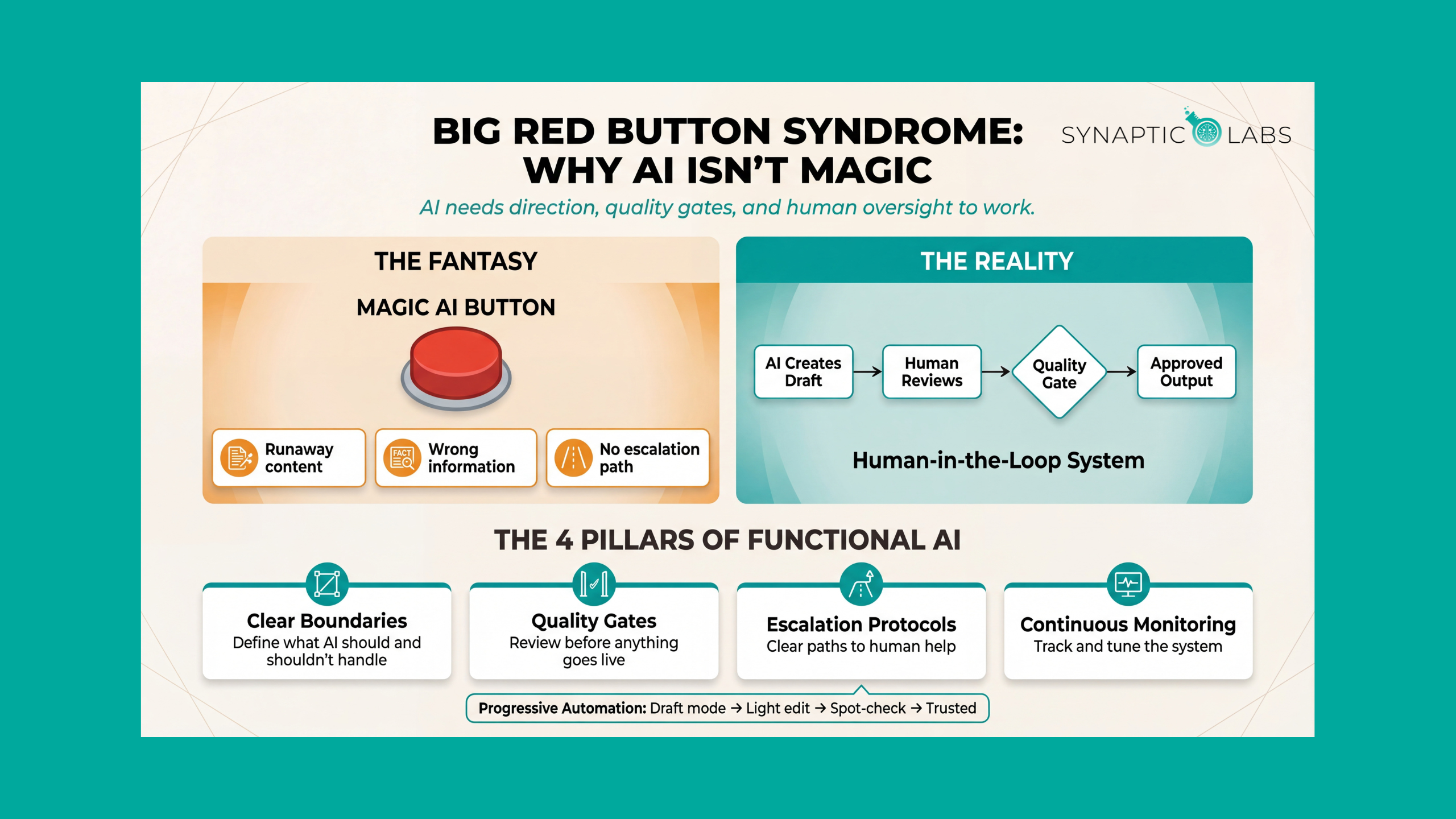
1. Clear Boundaries: Define exactly what AI should and shouldn't handle. Example: AI can draft email responses but humans must review anything involving refunds, complaints, or complex requests.
2. Quality Gates: Build checkpoints where humans review AI output before it goes live. Example: All AI-generated social media posts go to a content calendar where a human approves them before scheduling.
3. Escalation Protocols: Create clear paths for AI to hand off to humans when it's stuck. Example: Chatbot immediately transfers to human support when it detects frustration keywords or can't resolve an issue in 3 exchanges.
4. Continuous Monitoring: Track AI performance and regularly tune the system. Example: Weekly review of AI customer service interactions to identify improvement opportunities.
The Right Way to Implement AI
Start Small and Specific
Don't automate entire processes. Pick one specific, repetitive task within a larger workflow.
Instead of: "Automate all our marketing"
Try: "Use AI to draft social media posts that our marketing manager reviews and approves"
Build Progressive Automation
Start with AI as draft creator, gradually increase autonomy as the system proves reliable.
Week 1-2: AI creates drafts, human heavily edits. Week 3-4: AI creates drafts, human lightly edits. Week 5+: AI creates content, human spot-checks and approves.
Plan for Failure
Assume AI will make mistakes and build systems to catch them quickly. How will we know when AI makes an error? How quickly can a human step in to fix problems? What's our backup plan if the AI system goes down?
Real-World Success: The Right Approach
Company: Small law firm. Challenge: Time-consuming contract review. Wrong Approach: Let AI automatically approve contracts. Right Approach: AI flags potential issues in contracts, highlights specific clauses for human review, provides research on flagged items, human lawyer makes all final decisions, and the system learns from lawyer feedback. Result: 60% time savings on contract review while maintaining quality and reducing liability.
Want to know how ready your business is for AI? Take our free AI Readiness Assessment to find out where you stand. It takes just a few minutes, and you'll also get free access to one of our AI workflow templates to help you get started.
The Competitive Advantage
While your competitors are still searching for the magic button (and dealing with the resulting disasters), you're building robust systems that actually work.
The businesses winning with AI understand it's not about replacing human judgment. It's about amplifying human capabilities with smart systems design.
Ready to build AI systems that actually work? Stop chasing the magic button and start building the workflows that turn AI into a reliable competitive advantage.
Need help designing human-in-the-loop AI systems for your business? Get strategic guidance from the Synaptic Labs team.
Want to see this pitfall explained in action? Watch our full walkthrough: What are the Common AI Pitfalls for Small Businesses?
Frequently Asked Questions
What exactly is Big Red Button Syndrome?
Big Red Button Syndrome is the expectation that AI will work like a magic automation switch: press a button and everything runs perfectly without human involvement. In reality, AI needs clear direction, quality checkpoints, escalation protocols, and ongoing monitoring to deliver reliable business results. The syndrome leads to expensive failures when businesses automate without building proper oversight systems.
How do I know if my AI implementation needs more human oversight?
Look for these warning signs: AI outputs go live without anyone reviewing them, your team automatically approves AI recommendations without questioning them, there's no defined process for handling AI errors, or customers interact directly with AI without escalation options. If any of these apply, you need more human-in-the-loop checkpoints in your workflow.
What's the right level of automation to start with?
Start with AI in "draft mode" where it produces outputs that humans review before anything goes live. Think of it as a progression: Week 1-2, AI creates drafts and humans heavily edit. Week 3-4, AI creates drafts and humans lightly edit. Week 5 onward, AI creates content and humans spot-check and approve. Only increase AI autonomy as the system proves reliable in your specific context.
How do I build quality gates into my AI workflow?
Design checkpoints at every stage where AI output could impact your business. For content, add human review before publishing. For customer interactions, set triggers that escalate to humans (frustration keywords, complex requests, high-value accounts). For data analysis, require human validation of key findings before decisions are made. The goal is catching AI errors before they reach customers or stakeholders.
Can AI ever be fully autonomous for business tasks?
For some extremely narrow, well-defined, low-risk tasks (like sorting emails into categories or scheduling reminders), near-full automation can work. But for anything that touches customers, involves judgment calls, or carries business risk, some level of human oversight should always remain. The best approach is progressive automation with clear boundaries. For templates to structure your AI workflows, check our free Prompt Library.